Charge point OCPP configuration
Principle
Charge points communicate with the Fuzz Local Controller via the OCPP 1.6 JSON protocol.
In this architecture, the Local Controller acts as an OCPP proxy between the charge points and the remote CPO platform. Charge points therefore connect to the CPO platform through the Local Controller. Configuration is done via console.fuzz.energy.
The flow is as follows:
- The charge point connects over OCPP WebSocket to the Local Controller
- The Local Controller relays the communication to the CPO platform
- The controller can also intercept and locally control certain commands
This architecture provides:
- local energy control
- better network resilience
- simplified integration with Modbus equipment (meters, batteries, PV)
Settings to configure on the charge point
The following settings must be configured in the charge point's interface.
OCPP version
Use:
OCPP 1.6 JSON
OCPP URL
The URL must point to the Local Controller.
Example:
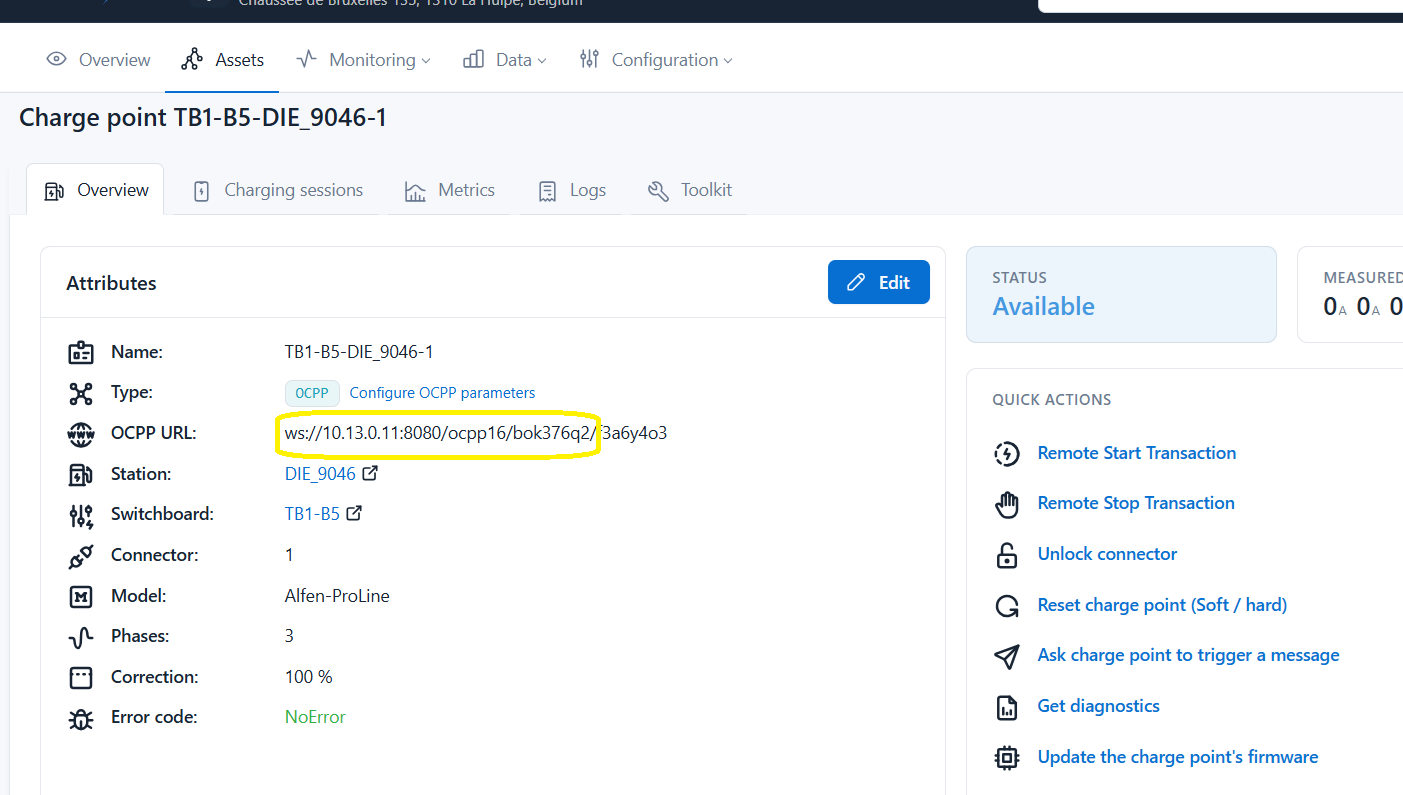
ws://LOCAL_CONTROLLER_IP:8080/ocpp16/TENANT_ID
The IP address corresponds to the Local Controller's address on the local network. This IP must have been set as described in the IT prerequisites.
The tenant ID corresponds to the site ID. It is a string of characters that uniquely identifies the site. This string is visible in the site URL on console.fuzz.energy.
The full URL is also visible on a charge point's page:
Charge Point ID
Each charge point must have a unique Charge Point ID.
This field allows the Local Controller and the platform to identify the charge point.
Examples:
CP-01
CP-02
PARKING-A-1
Checking the connection
Once the configuration has been applied:
- Reboot the charge point
- Check that the charge point establishes an OCPP WebSocket connection
- Check that the charge point appears in console.fuzz.energy
When the connection is established, the charge point must send a BootNotification message, visible in the site and charge point logs.
Best practices
- Use OCPP rather than Modbus for charge point control
- Make sure each charge point has a unique Charge Point ID
- Check that the Local Controller network port is reachable
- Reboot the charge point after changing the OCPP URL
Communication diagram
        │
        │  OCPP (WebSocket)
        ▼
Fuzz Local Controller
        │
        │  OCPP proxy
        ▼
    CPO platform```